
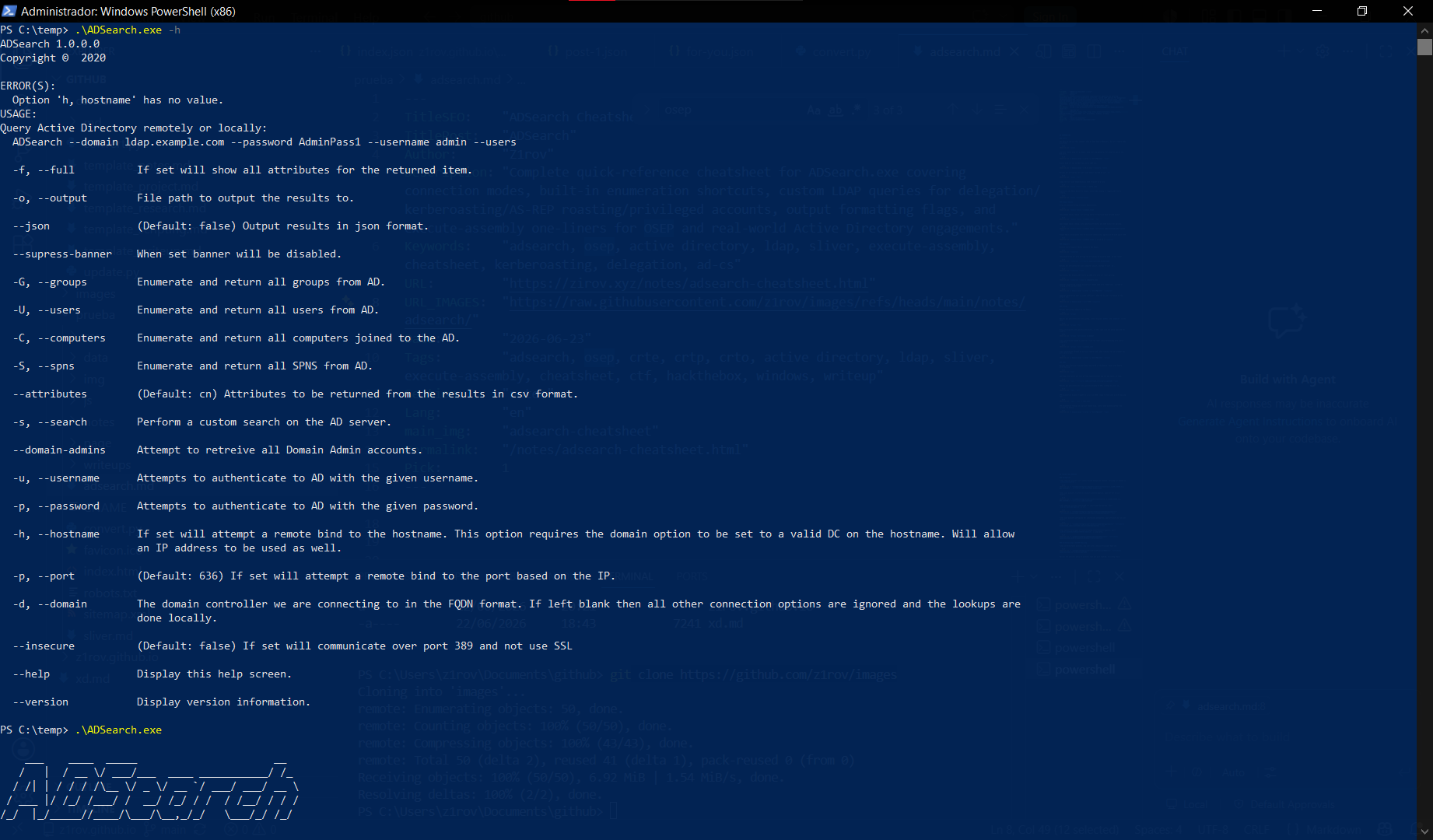
ENUMERATION
Users
For this we can use this command, when we dont have credentials, but if a remote code execution.
ADSearch.exe --users
Explicit remote bind for a domain, with user and password, for defaults the DC use 636 port.
ADSearch.exe -d domain.local -u z1rov -p 'Z1rovP@ss123!' --users
Remote bind for IP, in this case force LDAP use.
ADSearch.exe -d domain.local -h 10.10.10.5 --insecure --users
Returns all attributes for every user object instead of just cn.
ADSearch.exe --users --full
Dumps the full user enumeration as JSON straight to a file.
ADSearch.exe --users --full --json -o users.json
Suppresses the ASCII banner on output, useful when piping or logging the result cleanly.
ADSearch.exe --users --supress-banner
Domain Admins
Array of accounts belong in Domain Admin groups.
ADSearch.exe --domain-admins -d domain.local
Same Domain Admins lookup, but pulling every attribute on each matched account.
ADSearch.exe --domain-admins -d domain.local --full
Same Domain Admins lookup, with specific attributes and JSON output for parsing.
ADSearch.exe --domain-admins -d domain.local --attributes samaccountname,description --json
Domain Admins enumeration over an explicit remote bind, against an IP with plain LDAP.
ADSearch.exe --domain-admins -d domain.local -h 10.10.10.5 --insecure
Computers
Returns every computer object joined to the domain.
ADSearch.exe --computers
Same enumeration but only pulling the attributes we actually need, in CSV format.
ADSearch.exe --computers --attributes samaccountname,dnshostname
Returns all attributes for every computer object, instead of just cn.
ADSearch.exe --computers --full
Same query, but dumping the result as JSON to a file for later parsing.
ADSearch.exe --computers --json -o computers.json
Computer enumeration through an explicit remote bind with credentials, instead of relying on the current token.
ADSearch.exe -d domain.local -u z1rov -p 'Z1rovP@ss123!' --computers
Computer enumeration over a custom LDAPS port, when the DC isn't listening on the default 636.
ADSearch.exe -d domain.local --port 6360 --computers
Groups
Returns every group object in the domain.
ADSearch.exe --groups
Returns all attributes for every group, useful to grab member and memberof in one shot.
ADSearch.exe --groups --full
Group enumeration with specific attributes, in this case just the group name and its members.
ADSearch.exe --groups --attributes cn,member
Group enumeration dumped as JSON to a file for later cross-referencing with users/computers.
ADSearch.exe --groups --json -o groups.json
Group enumeration through an explicit remote bind, when running from an external box with valid creds.
ADSearch.exe -d domain.local -u z1rov -p 'Z1rovP@ss123!' --groups
SPNs
Returns every Service Principal Name registered in the domain, recon step before Kerberoasting.
ADSearch.exe --spns
Same SPN enumeration but only pulling samaccountname and the SPN value, as JSON.
ADSearch.exe --spns --attributes samaccountname,serviceprincipalname --json
Returns all attributes for every account holding an SPN, instead of just cn.
ADSearch.exe --spns --full
SPN enumeration dumped straight to a file in JSON, ready to feed into a Kerberoasting tool.
ADSearch.exe --spns --json -o spns.json
SPN enumeration through an explicit remote bind, useful when authenticating from outside the domain.
ADSearch.exe -d domain.local -u z1rov -p 'Z1rovP@ss123!' --spns
CUSTOM LDAP QUERIES
Delegation
Finds computer accounts with unconstrained delegation enabled, matching bit 524288 in userAccountControl.
ADSearch.exe -s "(&(objectCategory=computer)(userAccountControl:1.2.840.113556.1.4.803:=524288))" --attributes samaccountname,dnshostname
Finds user accounts trusted for unconstrained delegation, same bit but on user objects.
ADSearch.exe -s "(&(objectCategory=user)(userAccountControl:1.2.840.113556.1.4.803:=524288))" --attributes samaccountname
Finds computer accounts configured for constrained delegation, where msds-allowedtodelegateto is set.
ADSearch.exe -s "(&(objectCategory=computer)(msds-allowedtodelegateto=*))" --attributes dnshostname,samaccountname,msds-allowedtodelegateto --json
Finds user accounts configured for constrained delegation, same attribute but on user objects.
ADSearch.exe -s "(&(objectCategory=user)(msds-allowedtodelegateto=*))" --attributes dnshostname,samaccountname,msds-allowedtodelegateto --json
Finds objects vulnerable to resource-based constrained delegation, where msDS-AllowedToActOnBehalfOfOtherIdentity is populated.
ADSearch.exe -s "(msDS-AllowedToActOnBehalfOfOtherIdentity=*)" --attributes samaccountname,msDS-AllowedToActOnBehalfOfOtherIdentity
Kerberoasting & AS-REP Roasting
Finds Kerberoastable accounts, any user with a Service Principal Name set.
ADSearch.exe -s "(&(objectCategory=user)(servicePrincipalName=*))" --attributes samaccountname,serviceprincipalname
Narrows the previous query to accounts that are also enabled, excluding stale/disabled SPN holders.
ADSearch.exe -s "(&(objectCategory=user)(servicePrincipalName=*)(!(userAccountControl:1.2.840.113556.1.4.803:=2)))" --attributes samaccountname,serviceprincipalname
Finds AS-REP roastable accounts, those flagged to not require Kerberos preauthentication (bit 4194304).
ADSearch.exe -s "(&(objectCategory=user)(userAccountControl:1.2.840.113556.1.4.803:=4194304))" --attributes samaccountname
Finds Kerberoastable accounts that also belong to privileged groups, by combining SPN presence with adminCount.
ADSearch.exe -s "(&(objectCategory=user)(servicePrincipalName=*)(adminCount=1))" --attributes samaccountname,serviceprincipalname
Password & Account Flags
Finds accounts whose password is set to never expire, bit 65536 in userAccountControl.
ADSearch.exe -s "(&(objectCategory=user)(userAccountControl:1.2.840.113556.1.4.803:=65536))" --attributes samaccountname
Finds accounts that don't require a password at all, bit 32 in userAccountControl.
ADSearch.exe -s "(&(objectCategory=user)(userAccountControl:1.2.840.113556.1.4.803:=32))" --attributes samaccountname
Finds accounts storing their password with reversible encryption, bit 128 in userAccountControl.
ADSearch.exe -s "(&(objectCategory=user)(userAccountControl:1.2.840.113556.1.4.803:=128))" --attributes samaccountname
Finds disabled accounts, bit 2 in userAccountControl, useful to filter noise or spot re-enable candidates.
ADSearch.exe -s "(&(objectCategory=user)(userAccountControl:1.2.840.113556.1.4.803:=2))" --attributes samaccountname
Finds currently locked-out accounts, by checking that lockoutTime is set above zero.
ADSearch.exe -s "(&(objectCategory=user)(lockoutTime>=1))" --attributes samaccountname,lockoutTime
Finds accounts flagged to change their password at next logon, where pwdLastSet equals zero.
ADSearch.exe -s "(&(objectCategory=user)(pwdLastSet=0))" --attributes samaccountname
Finds accounts with a legacy userPassword attribute populated, common in misconfigured LDAP imports.
ADSearch.exe -s "(&(objectCategory=user)(userPassword=*))" --attributes samaccountname,userPassword
Finds accounts where the description field contains the word "pass", a classic spot for leaked credentials.
ADSearch.exe -s "(&(objectCategory=user)(description=*pass*))" --attributes samaccountname,description
Privileged Accounts & Groups
Finds every object flagged as protected/privileged via adminCount=1, regardless of current group membership.
ADSearch.exe -s "(&(objectCategory=user)(adminCount=1))" --attributes samaccountname
Finds the members of the Enterprise Admins group directly by CN.
ADSearch.exe -s "(&(objectCategory=group)(cn=Enterprise Admins))" --attributes cn,member
Finds the members of the Schema Admins group directly by CN.
ADSearch.exe -s "(&(objectCategory=group)(cn=Schema Admins))" --attributes cn,member
Finds any group whose name contains "Admins", a quick way to surface custom privileged groups.
ADSearch.exe -s "(&(objectCategory=group)(cn=*Admins))" --attributes cn,member
Finds users whose primary group ID is 512, meaning Domain Admins is set as their primary group instead of a normal default.
ADSearch.exe -s "(&(objectCategory=user)(primaryGroupID=512))" --attributes samaccountname
Domain Controllers & Infrastructure
Finds all Domain Controller computer objects via the userAccountControl flag for server trust accounts.
ADSearch.exe -s "(&(objectCategory=computer)(userAccountControl:1.2.840.113556.1.4.803:=8192))" --attributes dnshostname
Finds Read-Only Domain Controllers specifically, by their dedicated userAccountControl bit.
ADSearch.exe -s "(&(objectCategory=computer)(userAccountControl:1.2.840.113556.1.4.803:=67108864))" --attributes dnshostname
Finds computers running outdated operating systems, in this case anything reporting Windows Server 2008.
ADSearch.exe -s "(&(objectCategory=computer)(operatingSystem=*2008*))" --attributes samaccountname,operatingSystem
Finds Group Managed Service Accounts (gMSA) configured in the domain.
ADSearch.exe -s "(objectClass=msDS-GroupManagedServiceAccount)" --attributes samaccountname,msDS-GroupMSAMembership
Trusts & Certificate Services
Finds all domain trust objects, useful to map cross-forest or external trust relationships.
ADSearch.exe -s "(objectClass=trustedDomain)" --attributes cn,trustDirection,trustType
Finds published certificate templates in AD CS, a starting point for ESC1/ESC8-style abuse hunting.
ADSearch.exe -s "(objectClass=pKICertificateTemplate)" --attributes cn,displayName
Finds the Enrollment Services registered for AD CS, pointing to the actual CA servers in the domain.
ADSearch.exe -s "(objectClass=pKIEnrollmentService)" --attributes cn,dNSHostName
Misc Objects
Finds all Group Policy Objects defined in the domain, useful for spotting GPO-based privilege escalation paths.
ADSearch.exe -s "(objectCategory=groupPolicyContainer)" --attributes cn,displayName
Finds all Organizational Units in the domain, to map out the delegation/structure of the environment.
ADSearch.exe -s "(objectCategory=organizationalUnit)" --attributes ou,distinguishedName
Finds accounts carrying a SID History value, often a leftover from migrations and a potential privilege escalation vector.
ADSearch.exe -s "(&(objectCategory=user)(sIDHistory=*))" --attributes samaccountname,sIDHistory
Finds computer objects with a readable LAPS password attribute, when the current account has read rights over it.
ADSearch.exe -s "(ms-Mcs-AdmPwd=*)" --attributes samaccountname,ms-Mcs-AdmPwd